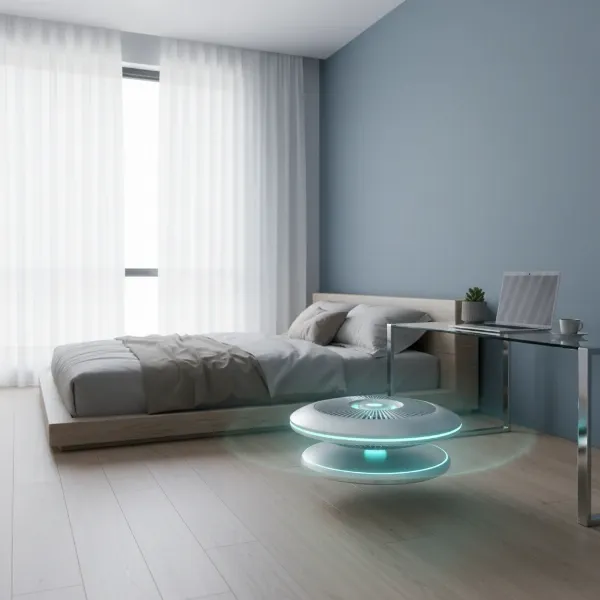
The landscape of home appliances is constantly evolving, transforming from simple mechanical devices into sophisticated, interconnected systems designed to enhance our daily lives. In this shift, the humble electric fan has undergone a significant transformation, emerging as the “smart fan.” But in a world already brimming with intelligent gadgets, is a Wi-Fi enabled fan truly a worthwhile upgrade for your home, or just another feature you don’t really need? This article will delve into the world of smart fans, exploring their benefits, limitations, and key considerations to help you decide if making the leap is the right choice for your comfort and lifestyle.
Electric Fans: Overview and Popular Types
For generations, electric fans have been indispensable household items, providing essential air circulation and cooling long before air conditioning became commonplace. Their history spans over a century, evolving from basic oscillating desk units to sophisticated ceiling installations. Traditionally, fans are categorized by their placement and design, including ceiling fans, which are mounted overhead to circulate air; tower fans, which are tall, slender units designed for vertical airflow in tight spaces; and desk or pedestal fans, offering portable cooling.
With the advent of smart home technology, these traditional fan types have embraced new capabilities. A smart fan, whether ceiling, tower, or desk-mounted, integrates wireless connectivity, typically Wi-Fi or Bluetooth, allowing it to communicate with other devices and be controlled in innovative ways. This connectivity transforms a simple cooling device into an intelligent part of your home ecosystem.
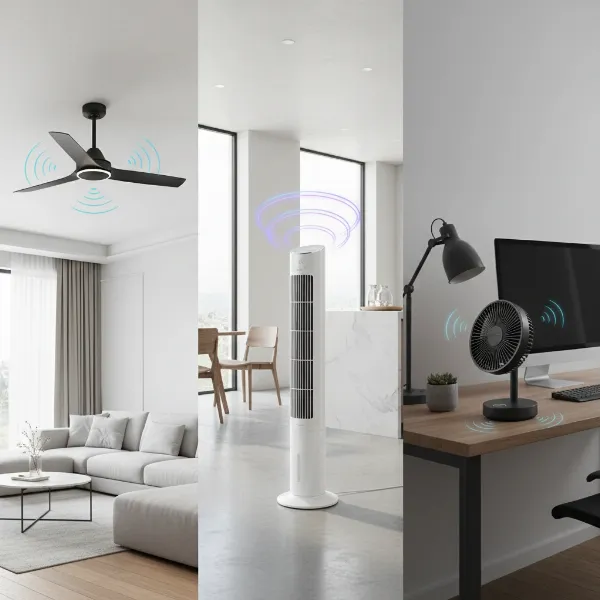 Illustration showing various types of smart fans: ceiling fan, tower fan, and desk fan, highlighting their connectivity.
Smart Fans: The Evolution of Cooling
What truly defines a “smart” fan is its ability to connect and communicate, extending control beyond a physical switch or basic remote. Wi-Fi and Bluetooth connectivity are at the core, enabling control via smartphone apps, voice assistants like Amazon Alexa, Google Assistant, or Apple HomeKit.
Key features often found in smart fans include:
- Remote Control: Adjust settings from anywhere using a smartphone app.
- Scheduling and Automation: Program the fan to turn on or off at specific times, or to adjust speed based on environmental factors like room temperature or occupancy.
- Variable Speed Settings: Most smart fans offer a wider range of speed options (often 6-8+) compared to traditional fans’ typical three settings.
- Reversible Motors: Allow the fan to be used year-round, circulating cool air in summer and pushing warm air down in winter.
- Integrated LED Lighting: Many smart ceiling fans come with built-in LED lights that can be dimmed or even change color temperature, often controlled through the same app or voice commands.
- Sensors: Some advanced models include temperature, humidity, or motion sensors to automatically optimize performance.
These features fundamentally enhance the user experience, offering unprecedented convenience and a level of comfort customization that traditional fans simply cannot match.
Guide to Choosing the Right Smart Fan
Selecting the perfect smart fan involves more than just picking a stylish model; it requires a thoughtful assessment of your specific needs and priorities.
Assessing Your Usage Needs
Before diving into features, consider how and where the fan will be used:
- Room Size: The size of your room dictates the appropriate fan size and airflow capacity. A large room might require a powerful smart ceiling fan, while a bedroom could benefit from a quiet smart tower fan.
- Purpose: Are you primarily seeking improved cooling, better air circulation, seamless smart home integration, or enhanced lighting? Understanding your main goal will guide your choices.
- Budget: Smart fans typically carry a higher upfront cost than their traditional counterparts. However, factor in potential long-term energy savings that could offset the initial investment.
|
Our Picks for the Best Electric fan in 2026
As an Amazon Associate I earn from qualifying purchases.
|
||
| Num | Product | Action |
|---|---|---|
| 1 | Amazon Basics 16" Pedestal Fan with Remote, Floor Fan, Standing Fan for Bedroom, Living Room, Office, with 3 Speeds, 3 Modes, Timer, Dual-Layered Blades, Adjustable Height, Tilt Head, 60W, Black |

|
| 2 | Dreo Fan for Bedroom, 120° Oscillating Standing Fans, Quiet Floor Fan with DC Motor, 100ft Pedestal Fans for Room, 9 Speeds, 4 modes, 20dB, 120° Manual Vertical, 37-42" Adjustable Height, 9H Timer |
|
| 3 | Dreo Tower Fan for Bedroom, 25ft/s Velocity Quiet Floor Fan, 90° Oscillating Fans for Indoors with 4 Speeds, 4 Modes, 8H Timer, Standing Fans, Bladeless Fan, Black, Nomad One (DR-HTF007) |
|
| 4 | Viniper Portable Rechargeable Fan, Small Desk Fan : 3 Speeds & about 8-24 Hours Longer Working, 180 Rotation, Portable Desktop Fan Small but Mighty, Strong Wind (White, Light Black Blade)6.2 Inch |
|
| 5 | Dreo Fan for Bedroom, 120° Oscillating Standing Fan, Quiet Floor Fan with DC Motor, Pedestal Fan for Room, 9 Speeds, 4 modes, 20dB, 120° Manual Vertical, 37-42" Adjustable Height, 9H Timer, Black |
|
| 6 | LEVOIT Tower Fan for Bedroom, 25ft/s Velocity Standing Fan with 28dB Quiet for Sleep, Remoter, 12H Timer, 5 Speeds, 4 Modes, 90° Oscillation for Home, Office, Indoor, Bladeless 36 inch, White |
|
| 7 | 10" Modern Standing Fan for Bedroom, Sleek Oscillating Pedestal Fan, 3-Speed & Height Adjustable Compact Floor Fan for Home Office & Dorm |
|
| 8 | Amazon Basics Air Circulator Fan, Desk Fan for Bedroom, Home and Office, With 90-Degree Tilt Head, 3 Speed Settings, Lightweight (3 LBS), 35 Watts, Black, 11.1"W x 6.3"D x 10.9"H |
|
| 9 | Lasko 2520 Oscillating Stand Fan,White 16 Inch |
|
| 10 | XPOWER FC-100S Multipurpose 11 Pro Air Circulator Utility Fan with Oscillating Feature |
|
Key Criteria for Selection
Once your needs are clear, evaluate smart fans based on these important criteria:
- Power and Airflow: Look for the fan’s Cubic Feet per Minute (CFM) rating to gauge its air movement capability. More speed settings offer finer control over airflow.
- Noise Level: For bedrooms or quiet workspaces, a fan with low decibel ratings, especially at lower speeds, is crucial. Many smart fans with DC motors are notably quieter.
- Features: Prioritize features that genuinely add value to your life, such as sophisticated scheduling, specific smart home ecosystem compatibility (Alexa, Google Home, HomeKit), or natural breeze modes.
- Brand and Reliability: Research reputable brands known for their smart home devices. Check product reviews and warranty information to ensure reliability and customer support.
- Energy Efficiency: A key selling point for many smart fans is their energy-saving capabilities. Models with Brushless Direct Current (DC) motors consume significantly less power than traditional Alternating Current (AC) motors, leading to lower electricity bills.
Smart vs. Traditional: A Comparative Look
To highlight the distinction, here’s a brief comparison:
| Feature | Traditional Fan | Smart Fan |
|---|---|---|
| Control | Pull chains, wall switch, basic IR remote | Smartphone app, voice commands, advanced RF remote, automation, sensors |
| Motor Type | Often AC motor | Often DC motor (more efficient, quieter, longer lasting) |
| Speed Settings | Typically 3 speeds | Often 6-8+ speeds, sometimes continuous variable speed |
| Energy Usage | Higher (e.g., 30-75W for ceiling fans) | Lower (e.g., 10-35W for DC motor ceiling fans) |
| Automation | Manual adjustment only | Scheduling, adaptive speed, motion/temperature-based operation |
| Integration | Limited to none | Seamless with smart home hubs and voice assistants |
| Initial Cost | Lower ($80-$150 for basic models) | Higher ($200-$500+ for many models) |
| Lighting | Basic on/off light kit | Integrated dimmable LED, color temperature adjustment |
While traditional fans offer a simple, cost-effective cooling solution, smart fans excel in environments where convenience, energy savings, and integration with a larger smart home ecosystem are desired.
Top Smart Fan Models: A Comparative Table
While specific model recommendations can change frequently with new product releases, the market offers various excellent smart fan options across different categories. For ceiling fans, look for brands known for integrating robust smart home platforms and offering energy-efficient DC motors. Some popular models feature advanced controls for fan speed, integrated dimmable LED lights, and compatibility with major voice assistants.
For smart tower and desk fans, key features to consider include a wide range of speed settings, quiet operation (especially for bedrooms or offices), oscillation angles, and multifunctionality (like air purification or heating, as seen in some premium desk fans). Manufacturers are continually innovating to improve connectivity, aesthetic design, and the user interface of their companion apps. When choosing, prioritize models that receive consistent positive reviews for both their “smart” capabilities and their core fan performance, ensuring a balance between technology and essential functionality.
Smart Fan Benefits: Are They Worth the Upgrade?
The core question remains: are smart fans worth the upgrade? For many, the benefits far outweigh the added complexity and cost.
Unparalleled Convenience and Control
Imagine adjusting your fan speed or turning off the light from your bed with a simple voice command, or cooling your living room from your smartphone before you even arrive home. Smart fans deliver this level of effortless control.
“The ability to control your home’s climate from literally anywhere, whether you’re on the couch or across town, fundamentally changes how you interact with your living space.” – Electricfanatic Admin, Expert in Electric Fans
Scheduling features allow you to automate your fan’s operation based on your daily routine, ensuring comfort without constant manual adjustments. This hands-free and remote operation provides a significant leap in convenience.
Enhanced Energy Efficiency and Cost Savings
Many smart fans, particularly those employing DC motors, are engineered for superior energy efficiency. DC motors consume significantly less power, often up to 70% less than traditional AC motors. Advanced features like adaptive speed control, which adjusts fan speed based on room temperature, and eco-modes further optimize energy consumption. By programming your fan to turn off when a room is unoccupied (via motion sensors or schedules), smart fans actively work to reduce unnecessary power usage, leading to noticeable savings on your electricity bills over time.
Superior Comfort and Customization
Smart fans often offer a greater number of speed settings, allowing for more precise control over airflow to match your exact comfort level. The reversible motor function is invaluable for maintaining comfort throughout the year, gently circulating warm air in winter and creating a cooling breeze in summer. Integrated LED lighting in smart ceiling fans adds another layer of customization, allowing you to adjust brightness and even color temperature to set the perfect ambiance for any occasion.
Seamless Smart Home Integration
For those who have already embraced the smart home ecosystem, a Wi-Fi enabled fan integrates effortlessly. It can be linked with smart thermostats, lighting systems, and other IoT devices to create cohesive, automated routines. For example, your smart fan could automatically increase speed when your smart thermostat detects a rise in temperature, or dim its lights when you activate “movie night” mode. This interconnectedness builds a truly intelligent living environment.
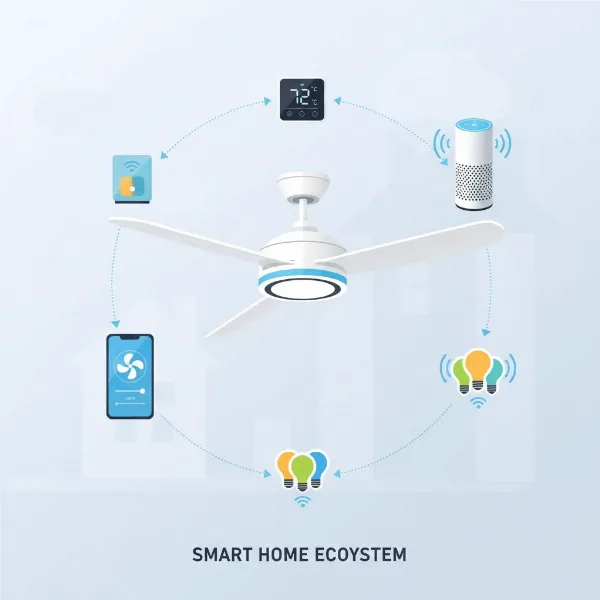 A smart fan seamlessly integrated into a smart home ecosystem, controlled by a smartphone app or voice assistant.
Understanding the Drawbacks: When Smart Isn’t Always Better
Despite their many advantages, smart fans also come with certain limitations and potential frustrations that are important to consider before making a purchase.
Higher Upfront Cost
The most immediate drawback of smart fans is their price tag. They are generally more expensive than their traditional counterparts, with advanced features and smart connectivity contributing to a higher initial investment. This can be a barrier for budget-conscious consumers who may find the added expense difficult to justify.
Reliance on Wi-Fi Connectivity
A fundamental aspect of a smart fan is its dependence on a stable Wi-Fi connection. If your home internet is unreliable, or if there’s a power outage that affects your Wi-Fi router, the “smart” features of your fan may become inaccessible. While most smart fans retain basic manual controls, the loss of remote and automated functionality can be frustrating for users who rely on these features.
Technical Complexities and App Dependence
Setting up a smart fan can be more complex than installing a traditional one, often requiring network configuration and app downloads. Furthermore, like any intelligent device, smart fans can experience technical issues such as connectivity problems, software glitches, or compatibility conflicts with other smart home devices. There’s also the risk of app obsolescence, where a manufacturer might discontinue support for an older app or cloud platform, potentially rendering some smart features unusable over time. It’s crucial to choose products that support widely adopted smart home platforms to mitigate this risk.
Where to Purchase Reputable Smart Fans
When investing in a smart fan, purchasing from a reputable source is essential to ensure product quality, valid warranties, and reliable customer support. Major electronics retailers and dedicated smart home stores, both online and physical, are excellent places to start. Popular online marketplaces also offer a wide selection, but it’s vital to check seller ratings and product reviews carefully. Always confirm the warranty period and understand the return policy before finalizing your purchase. A little due diligence goes a long way in securing a satisfactory smart fan experience.
Essential Tips for Using and Maintaining Your Smart Fan
To ensure your smart fan operates efficiently and has a long lifespan, proper usage and maintenance are key.
Proper Cleaning Techniques
Regular cleaning prevents dust buildup, which can hinder performance and even damage the motor.
- Frequency: Aim to clean your fan every 1-3 months, depending on usage and household dust levels.
- Tools Needed: Microfiber cloths, a soft brush or vacuum with a brush attachment, and mild soapy water.
- Steps:
- Always disconnect power before cleaning.
- For ceiling fans, carefully wipe down blades with a damp cloth. For tower and desk fans, disassemble removable grilles and blades if possible, and clean them thoroughly.
- Use a soft brush or vacuum to remove dust from vents and internal components.
- Ensure all parts are completely dry before reassembling and restoring power.
Safe and Effective Operation
Beyond cleaning, how you operate your smart fan impacts its longevity and your comfort.
- Optimal Placement: Position fans to maximize airflow without obstruction. For ceiling fans, ensure appropriate clearance from walls and furniture.
- Adjust Speed Appropriately: While smart fans offer many speeds, using the lowest effective speed conserves energy and reduces wear on the motor.
- Avoid Continuous Use: Even efficient DC motors benefit from occasional rest. Utilize scheduling features to turn off the fan when not needed, rather than running it 24/7.
Prolonging Lifespan
Periodic checks and care can significantly extend your smart fan’s life.
- Inspect Regularly: Check for loose screws, wobbling blades (on ceiling fans), or unusual noises. Address any issues promptly.
- Lubrication: Some older or heavy-duty fan motors may require occasional lubrication. Consult your user manual for specific instructions. Most modern DC motor fans are maintenance-free in this regard.
- Proper Storage: If you store portable smart fans during off-seasons, ensure they are clean, dry, and protected from dust and extreme temperatures.
Following these tips will keep your smart fan running smoothly, quietly, and efficiently for years to come.
Ultimately, smart fans offer a compelling blend of convenience, energy efficiency, and customizable comfort that traditional models simply cannot match. While they come with a higher initial cost and a reliance on stable Wi-Fi connectivity, the ability to control your environment with a simple voice command or automated schedule can transform your daily living experience. For those integrated into the smart home ecosystem, the upgrade is often a seamless and rewarding one, providing long-term savings and enhanced comfort. Are you ready to embrace the future of home cooling?