Working in an office cubicle can sometimes feel like an uphill battle against rising temperatures. You’re trying to focus, but the stagnant air or the distant hum of the central AC just isn’t cutting it. That’s where a dedicated desk fan steps in, offering a personal oasis of cool air without disrupting your concentration or your colleagues. Finding the perfect electric fan for your workspace means balancing power with an ultra-quiet operation and a compact design that fits seamlessly into your cubicle.
Electric Fans: An Overview and Popular Types
Electric fans have been a cornerstone of personal comfort for over a century, evolving from bulky industrial units to sleek, sophisticated devices. At their core, they function by moving air, creating a cooling effect through convection and evaporation. For an office cubicle, the primary goal is often discreet, localized airflow.
There are several types of electric fans that might find a home on your desk:
- Traditional Bladed Desk Fans: These are the most common, featuring visible blades protected by a grille. They vary greatly in size and power, offering direct and often strong airflow. Smaller, personal versions are designed to be compact and can be surprisingly effective for individual cooling.
- Bladeless Fans: Known for their modern aesthetics and often quieter operation, bladeless fans (like those popularized by Dyson) draw air into a base and then expel it through a thin slit, creating a smooth, uninterrupted airflow. They are generally safer and easier to clean, though often pricier and sometimes larger.
- USB Fans: These compact fans draw power directly from a computer’s USB port, making them incredibly convenient for cubicle use. While typically less powerful than AC-powered fans, their small size and silent operation on lower settings make them ideal for personal cooling right at your workstation.
- Clip-On Fans: Designed to attach to the edge of your desk, shelf, or cubicle wall, clip-on fans are excellent for saving precious desk space. They often offer good adjustability and can direct airflow precisely where you need it.
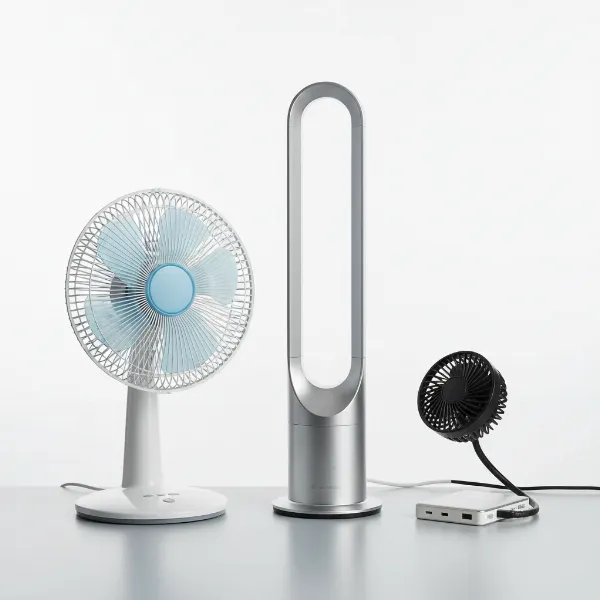 Assortment of compact, quiet desk fans including bladed, bladeless, and USB types.
For a cubicle, the most effective choices usually narrow down to compact bladed, small bladeless, or USB-powered models. Each type presents its own set of advantages and considerations, primarily concerning noise output and the physical space it occupies.
How to Choose the Right Desk Fan for Your Office Cubicle
Selecting the ideal electric fan for your cubicle requires careful consideration of your specific environment and personal preferences. It’s not just about moving air; it’s about doing so efficiently, quietly, and unobtrusively.
Assess Your Needs
Before diving into specifications, take a moment to evaluate your workspace and cooling requirements.
- Cubicle size/desk space: How much room do you have on your desk or nearby? A bulky fan will only add clutter. Measure your available space to ensure a good fit.
- Cooling purpose: Do you need a gentle breeze for personal comfort, or more powerful airflow to combat a particularly warm spot? This dictates the fan’s required power.
- Budget: Desk fans range from affordable USB models to premium bladeless options. Set a realistic budget to narrow down your choices.
|
Our Picks for the Best Electric fan in 2026
As an Amazon Associate I earn from qualifying purchases.
|
||
| Num | Product | Action |
|---|---|---|
| 1 | Dreo Fan for Bedroom, 120° Oscillating Standing Fan, Quiet Floor Fan with DC Motor, Pedestal Fan for Room, 9 Speeds, 4 modes, 20dB, 120° Manual Vertical, 37-42" Adjustable Height, 9H Timer, Black |

|
| 2 | Lasko 2520 Oscillating Stand Fan,White 16 Inch |
|
| 3 | Dreo Tower Fan for Bedroom, 25ft/s Velocity Quiet Floor Fan, 90° Oscillating Fans for Indoors with 4 Speeds, 4 Modes, 8H Timer, Standing Fans, Bladeless Fan, Black, Nomad One (DR-HTF007) |
|
| 4 | Viniper Portable Rechargeable Fan, Small Desk Fan : 3 Speeds & about 8-24 Hours Longer Working, 180 Rotation, Portable Desktop Fan Small but Mighty, Strong Wind (White, Light Black Blade)6.2 Inch |
|
| 5 | Dreo Fan for Bedroom, 120° Oscillating Standing Fans, Quiet Floor Fan with DC Motor, 100ft Pedestal Fans for Room, 9 Speeds, 4 modes, 20dB, 120° Manual Vertical, 37-42" Adjustable Height, 9H Timer |
|
| 6 | Amazon Basics Air Circulator Fan, Desk Fan for Bedroom, Home and Office, With 90-Degree Tilt Head, 3 Speed Settings, Lightweight (3 LBS), 35 Watts, Black, 11.1"W x 6.3"D x 10.9"H |
|
| 7 | XPOWER FC-100S Multipurpose 11 Pro Air Circulator Utility Fan with Oscillating Feature |
|
| 8 | 10" Modern Standing Fan for Bedroom, Sleek Oscillating Pedestal Fan, 3-Speed & Height Adjustable Compact Floor Fan for Home Office & Dorm |
|
| 9 | Amazon Basics 16" Pedestal Fan with Remote, Floor Fan, Standing Fan for Bedroom, Living Room, Office, with 3 Speeds, 3 Modes, Timer, Dual-Layered Blades, Adjustable Height, Tilt Head, 60W, Black |
|
| 10 | LEVOIT Tower Fan for Bedroom, 25ft/s Velocity Standing Fan with 28dB Quiet for Sleep, Remoter, 12H Timer, 5 Speeds, 4 Modes, 90° Oscillation for Home, Office, Indoor, Bladeless 36 inch, White |
|
Key Criteria for Selection
Once you understand your needs, focus on these critical criteria when evaluating potential desk fans.
- Power and airflow: While you want a compact fan, it still needs to be effective. Look for fans that offer adjustable speeds, allowing you to control the intensity of the breeze. Consider the fan’s CFM (Cubic Feet per Minute) if available, though for small personal fans, user reviews on cooling effectiveness are often more telling.
- Noise level: This is paramount in a shared office. A quiet fan is typically one operating below 40 decibels (dB). Many manufacturers provide dB ratings; aim for the lowest possible, especially at your preferred operating speed. Look for features like “whisper quiet” or “silent operation.”
- Features:
- USB vs. AC: USB fans are great for convenience, plugging directly into your computer. AC fans generally offer more power but require an available wall outlet.
- Oscillation: Some desk fans can rotate side-to-side, distributing air over a wider area. While useful, for a single cubicle, a fixed fan aimed directly at you might be more effective.
- Speed settings: Multiple speed options give you flexibility to adjust cooling based on the temperature.
- Timer: A timer function can be useful if you tend to forget to turn off appliances.
- Brand and Reliability: Reputable brands often come with better warranties and customer support. Check user reviews for insights into durability and long-term performance.
- Energy Efficiency: A small desk fan typically consumes very little power, but an energy-efficient model can still contribute to lower utility bills over time, especially if used daily.
Comparing Popular Desk Fan Types
Understanding the nuances of each fan type can help you make an informed decision for your cubicle.
- USB vs. AC powered: USB fans are incredibly convenient for cubicle environments where outlets might be scarce. They are usually very compact and operate quietly, though their cooling power is generally less than AC models. AC-powered fans offer more robust airflow but require an available wall outlet.
- Traditional vs. Bladeless: Traditional bladed fans are often more affordable and deliver direct, powerful airflow. However, they can be noisier, especially at higher settings, and require more frequent cleaning. Bladeless fans offer a sleek design, are easier to clean, and are generally quieter, but they come with a higher price tag and sometimes offer a less focused breeze.
- Clip-on vs. Stand-alone: Clip-on fans are fantastic for conserving desk space, attaching securely to a desk edge or shelf. Stand-alone desk fans provide more flexibility in placement but will occupy a portion of your valuable desk real estate.
“In an office setting, the perception of a fan’s ‘quietness’ is often more critical than its raw power. A fan that hums gently in the background is far more valuable than a powerful one that constantly reminds you it’s there.” – Admin, electricfanatic.com
Top-Rated Quiet & Compact Desk Fans for Office Cubicles
Choosing a specific model can be daunting with so many options available. Here’s a comparison of some highly-regarded quiet and compact desk fans that are frequently recommended for office cubicle use:
| Model | Key Features | Noise Level (dB) | Size (Approx.) | Pros | Cons | Best For |
|---|---|---|---|---|---|---|
| Honeywell HTF090B | 3 speeds, compact, strong airflow, tilt adj. | 35-50 | 6″ H x 5″ W x 3″ D | Powerful for its size, durable | Can be noisy on high setting | Personal, strong airflow, small spaces |
| Vornado Flippi V6 | 2 speeds, pivot head, modern design | 30-45 | 6.2″ H x 5″ W x 4.7″ D | Excellent air circulation, stylish | A bit pricier than basic fans | Air circulation, design-conscious users |
| OPOLAR Mini USB Desk Fan | USB powered, 3 speeds, 360° rotation | 20-35 | 6″ H x 4.8″ W x 3.3″ D | Very quiet, ultra-compact, USB-convenient | Limited power, plastic feel | Ultra-quiet, personal cooling, USB only |
| Fancii Small Personal Fan | USB or battery, 3 speeds, LED light | 25-40 | 5.5″ H x 4.5″ W x 1.5″ D | Highly portable, versatile power options | Less powerful, battery life varies | Travel, occasional use, extreme portability |
| Amazon Basics Clip-On Fan | 2 speeds, strong clip, flexible neck | 40-55 | 10″ H x 7″ W x 6″ D | Saves desk space, versatile placement | Can vibrate, louder than other options | Space-saving, targeted airflow |
Note: Noise levels are approximate and can vary based on speed settings and environmental factors. Always check current reviews for the latest product performance.
Tips for Using and Maintaining Your Office Desk Fan
Proper use and regular maintenance are crucial for ensuring your electric fan remains effective, quiet, and extends its lifespan.
Proper Cleaning
Dust and debris are the arch-enemies of a quiet and efficient fan. Regular cleaning prevents build-up, which can reduce airflow and increase noise.
- Frequency: Aim to clean your desk fan every 2-4 weeks, or more often if your office is particularly dusty.
- Tools: You’ll need a microfiber cloth, a soft brush (like an old toothbrush or paint brush), a can of compressed air, and potentially a screwdriver to remove grilles.
- Steps:
- Unplug the fan: Always disconnect power before cleaning.
- Remove grille: For bladed fans, carefully unscrew or unclip the front grille.
- Clean blades and motor housing: Use the brush and cloth to wipe down the blades and any accessible motor parts. Use compressed air for hard-to-reach areas or small vents.
- Clean grilles: Wash the grilles with soapy water if they’re very dirty, or simply wipe them clean. Ensure they are completely dry before reattaching.
- Reassemble: Securely reattach the grille and test the fan.
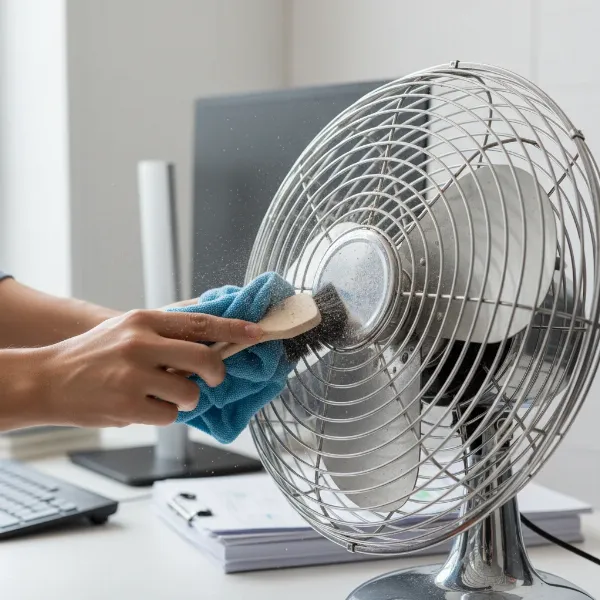 Person cleaning a dusty bladed desk fan with a brush and microfiber cloth.
Safe and Effective Use
Maximize your fan’s benefits while ensuring safety.
- Placement: Position the fan so it directs air directly at you, creating a personal cool zone. Avoid placing it where it might blow loose papers around or obstruct your view.
- Adjust speed: Start with the lowest speed setting and only increase it if necessary. Lower speeds are quieter and often sufficient for personal cooling.
- Avoid continuous use: While most modern fans are designed for extended operation, it’s good practice to turn off your fan when leaving your cubicle for long periods or at the end of the day. This saves energy and reduces wear on the motor.
Extending Lifespan
A little care goes a long way in ensuring your fan serves you well for years.
- Check and replace parts: Periodically inspect the power cord for any fraying or damage. If your fan has removable components like filters (for some air circulators), ensure they are cleaned or replaced as per manufacturer guidelines.
- Lubrication: Most modern desk fans have sealed motors that don’t require user lubrication. However, if you have an older model or notice squeaking, consult the manual for specific maintenance instructions.
- Proper storage: If you only use your fan seasonally, clean it thoroughly before storing it in a dry, dust-free place, ideally in its original box or covered with a cloth.
Where to Buy Reliable Desk Fans
Finding a trustworthy retailer is as important as choosing the right fan. Here are some reliable avenues for purchasing your next office desk fan:
- Online Retailers: Websites like Amazon, Best Buy, Walmart, and other major electronics retailers offer a vast selection. You can compare models, read numerous user reviews, and often find competitive prices.
- Office Supply Stores: Stores like Staples or Office Depot often carry a range of personal fans specifically marketed for office use. This can be a good option for seeing models in person.
- Electronics Superstores: Large electronics stores will have a broader selection of brands and models, including some higher-end options.
When buying, always double-check the product description against your needs, look for clear return policies, and inquire about warranty information. Prioritize retailers with good customer service records.
Desk Fan Buying Guide for Cubicles
Navigating the options for a quiet and compact electric fan for your office cubicle can be simplified by focusing on a few key questions.
What’s Your Budget?
Desk fans can cost anywhere from $15 for a basic USB model to over $100 for a premium bladeless fan. Determine how much you’re willing to invest, keeping in mind that a slightly higher price often means better features like quieter operation, more robust construction, and additional speed settings. If silence is paramount, be prepared to allocate a bit more.
How Much Desk Space Do You Have?
This is a practical limitation. Measure the available area on your desk – both footprint and height. If space is tight, a slender tower-style personal fan, a mini USB fan, or even a clip-on fan might be your best bet. Avoid anything with a wide base or significant depth that could crowd your workstation or block your monitor.
Which Features Are Essential For You?
Prioritize what truly matters for your specific office environment. Is whisper-quiet operation non-negotiable? Then focus on models with low decibel ratings. Do you need the convenience of USB power, or is a standard AC outlet perfectly fine? Would oscillation be beneficial for you, or is a direct, steady breeze sufficient? Creating a small checklist of your must-have features will significantly streamline your decision-making process.
“The best desk fan isn’t always the most powerful, but rather the one that provides the perfect balance of effective cooling and discreet operation for your personal workspace.” – Admin, electricfanatic.com
Conclusion
Finding the ideal quiet and compact electric fan for your office cubicle doesn’t have to be a challenge. By understanding your specific needs, evaluating key criteria like noise level and size, and considering different fan types, you can create a comfortable and productive personal workspace. Whether you opt for a silent USB fan, a sleek bladeless design, or a powerful compact bladed model, the right fan can significantly enhance your office comfort. With proper care and maintenance, your chosen electric fan will be a reliable companion against stuffy cubicle air for years to come.
What’s the one feature you simply can’t compromise on when it comes to your office desk fan?
Frequently Asked Questions
What is considered a quiet desk fan for an office?
A desk fan is generally considered quiet for an office environment if its noise output is below 40 decibels (dB), especially when operating at its most commonly used speed settings. Many personal fans designed for office use aim for levels between 20-35 dB, which is comparable to a whisper or soft background noise, making them ideal for maintaining focus.
Are USB fans powerful enough for an office?
For personal cooling in a cubicle, many USB fans are perfectly adequate. While they typically don’t offer the same high-velocity airflow as larger AC-powered fans, their convenience, compactness, and often very quiet operation make them an excellent choice for directed personal breezes right at your workstation. They are designed for individual comfort rather than cooling an entire room.
How often should I clean my desk fan?
To maintain optimal performance and quiet operation, it’s recommended to clean your desk fan every 2 to 4 weeks. Dust and debris accumulate on blades and grilles, reducing airflow and potentially increasing motor noise. Regular cleaning ensures efficiency and extends the fan’s lifespan, especially in dusty office environments.
Can I leave my desk fan on all day?
Most modern electric fans are built for continuous operation and are safe to leave on throughout your workday. However, it’s generally good practice to turn off any appliance, including your desk fan, when you’re leaving your cubicle for extended periods or at the end of the day. This conserves energy and minimizes wear and tear over time.
What’s the difference between a personal fan and a regular desk fan?
A “personal fan” often emphasizes compactness, portability, and very low noise levels, specifically designed to cool one individual in close proximity. A “regular desk fan” can be a broader category, including larger or more powerful models that might be designed for a small room or shared space, and may not prioritize ultra-quiet operation to the same extent as a personal fan.