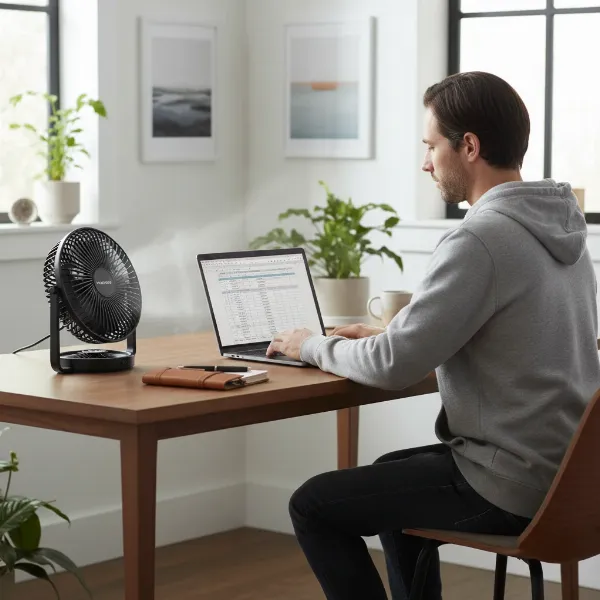
Few things are as frustrating as switching on your electric fan on a sweltering day, only to be met with a silent, stationary set of blades. As the Admin of ElectricFanatic.com and a technician with over a decade of hands-on experience, I’ve seen countless fans fall victim to this common issue. While it might seem like a dire situation, often the fix is simpler than you’d imagine. This guide will walk you through systematic troubleshooting steps, helping you diagnose why your electric fan isn’t spinning and empowering you to get it back in action.
Electric Fan Basics: Understanding the Components That Drive Airflow
Before diving into fixes, it’s helpful to understand the core components that enable your electric fan to move air. At its heart is the electric motor, which converts electrical energy into mechanical rotation. This motor drives a shaft, to which the fan blades are attached. Bearings or bushings support this shaft, ensuring smooth rotation. A capacitor often assists the motor in starting and maintaining its speed. All these components rely on a steady power supply delivered through the cord and controlled by switches. When any part of this system falters, the fan’s ability to spin is compromised.
Troubleshooting Your Electric Fan: A Step-by-Step Guide
When your fan refuses to budge, don’t panic. Follow these methodical steps to pinpoint the problem.
Initial Checks: Power and Obstructions
|
Our Picks for the Best Electric fan in 2026
As an Amazon Associate I earn from qualifying purchases.
|
||
| Num | Product | Action |
|---|---|---|
| 1 | Lasko 2520 Oscillating Stand Fan,White 16 Inch |

|
| 2 | 10" Modern Standing Fan for Bedroom, Sleek Oscillating Pedestal Fan, 3-Speed & Height Adjustable Compact Floor Fan for Home Office & Dorm |
|
| 3 | Dreo Fan for Bedroom, 120° Oscillating Standing Fan, Quiet Floor Fan with DC Motor, Pedestal Fan for Room, 9 Speeds, 4 modes, 20dB, 120° Manual Vertical, 37-42" Adjustable Height, 9H Timer, Black |
|
| 4 | LEVOIT Tower Fan for Bedroom, 25ft/s Velocity Standing Fan with 28dB Quiet for Sleep, Remoter, 12H Timer, 5 Speeds, 4 Modes, 90° Oscillation for Home, Office, Indoor, Bladeless 36 inch, White |
|
| 5 | Viniper Portable Rechargeable Fan, Small Desk Fan : 3 Speeds & about 8-24 Hours Longer Working, 180 Rotation, Portable Desktop Fan Small but Mighty, Strong Wind (White, Light Black Blade)6.2 Inch |
|
| 6 | Amazon Basics Air Circulator Fan, Desk Fan for Bedroom, Home and Office, With 90-Degree Tilt Head, 3 Speed Settings, Lightweight (3 LBS), 35 Watts, Black, 11.1"W x 6.3"D x 10.9"H |
|
| 7 | Dreo Fan for Bedroom, 120° Oscillating Standing Fans, Quiet Floor Fan with DC Motor, 100ft Pedestal Fans for Room, 9 Speeds, 4 modes, 20dB, 120° Manual Vertical, 37-42" Adjustable Height, 9H Timer |
|
| 8 | Amazon Basics 16" Pedestal Fan with Remote, Floor Fan, Standing Fan for Bedroom, Living Room, Office, with 3 Speeds, 3 Modes, Timer, Dual-Layered Blades, Adjustable Height, Tilt Head, 60W, Black |
|
| 9 | XPOWER FC-100S Multipurpose 11 Pro Air Circulator Utility Fan with Oscillating Feature |
|
| 10 | Dreo Tower Fan for Bedroom, 25ft/s Velocity Quiet Floor Fan, 90° Oscillating Fans for Indoors with 4 Speeds, 4 Modes, 8H Timer, Standing Fans, Bladeless Fan, Black, Nomad One (DR-HTF007) |
|
Begin with the simplest possibilities. These checks require no disassembly and can quickly resolve many common issues.
First, verify that your fan is properly plugged into a live electrical outlet. Test the outlet with another appliance to confirm it’s working. Next, check your home’s circuit breaker box for any tripped breakers, resetting them if necessary. Examine the fan’s power cord for any visible damage, frayed wires, or loose connections. Finally, ensure the fan’s main power switch and any speed controls are fully engaged. A loose or partially pressed button can prevent operation.
Now, turn your attention to the blades and motor area. Unplug the fan for safety. Visually inspect for any obvious obstructions: tangled cords, fallen objects, or a significant build-up of dust, pet hair, or other debris around the fan blades, grille, or motor shaft. Sometimes, these simple blockages are enough to prevent rotation. Try gently rotating the fan blades manually. Do they spin freely with minimal resistance, or do they feel stiff, sluggish, or completely seized? The way the blades move (or don’t move) by hand offers a crucial clue to the underlying problem.
Addressing Mechanical Resistance
If your fan’s blades feel stiff or struggle to turn manually, mechanical resistance is likely the culprit. This is often due to accumulated grime or a lack of lubrication.
Cleaning Accumulated Debris
Over time, dust, lint, and pet hair can accumulate around the motor shaft and within the bearings, creating friction that prevents the blades from spinning. To clean effectively, you’ll need to disassemble your fan. Start by unplugging it. Remove the front grille and the fan blade locking nut (often a reverse thread, turning clockwise to loosen). Carefully pull the blades off the shaft. You might need to remove the rear grille and the motor housing cover as well. Use a soft brush, compressed air, or a vacuum cleaner to thoroughly remove all dust and debris from the blades, grilles, and especially around the motor shaft. Pay close attention to the area where the shaft enters the motor housing.
Lubricating the Motor Shaft and Bearings
Once clean, lubrication can often bring a stiff fan back to life. The motor shaft and its bearings require a smooth, low-friction environment to operate. If the original lubricant has dried out or turned into a gummy residue, the shaft will seize.
Apply a few drops of light machine oil, such as 3-in-1 oil or specific motor oil, to the motor shaft where it enters the housing on both the front and back (if accessible). Avoid using WD-40 as a permanent lubricant; while it can initially loosen seized parts, it’s primarily a solvent and can dry out, leaving the components more prone to seizing again. After applying the oil, gently rotate the shaft by hand multiple times to help the lubricant penetrate the bearings. You should feel the resistance decrease, and the blades should spin more freely. Reassemble the fan and test its operation.
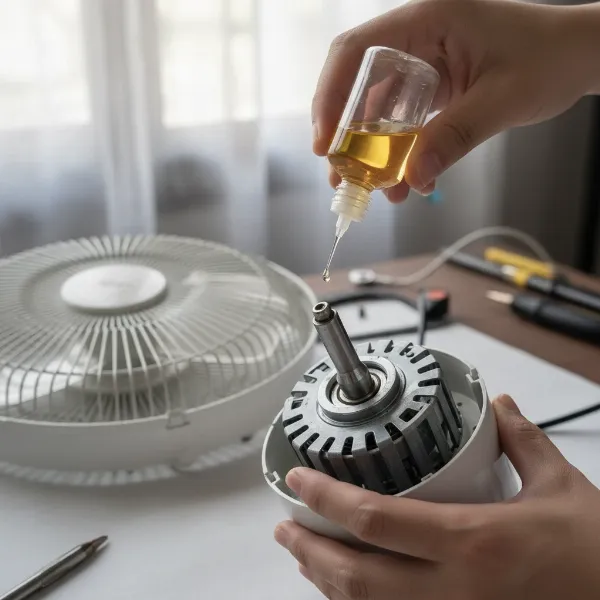 A person carefully applies oil to a disassembled electric fan's motor shaft and bearings.
Diagnosing Electrical Component Failures
If the fan blades spin freely by hand, and you’ve confirmed power is reaching the unit, the issue likely lies within an electrical component. These repairs are more complex and may require basic electrical knowledge.
Faulty Capacitor
The capacitor is a small, cylindrical component often found near the motor. It provides an initial jolt of electricity to help the motor start and run efficiently. If your fan hums but doesn’t spin, starts very slowly, or needs a manual push to begin rotating, a faulty capacitor is a strong possibility. Replacing a capacitor is a common DIY fix, but ensure you replace it with one of identical specifications (microfarads and voltage) and discharge the old capacitor safely before handling, as it can store an electrical charge.
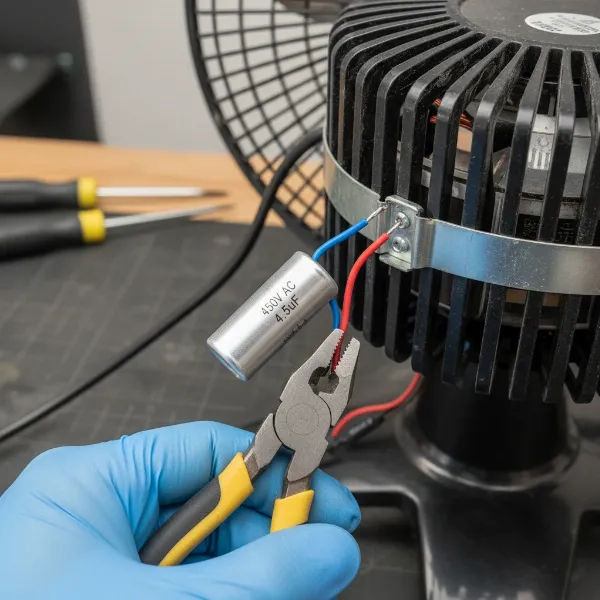 Close-up of a cylindrical capacitor being replaced in an electric fan motor assembly.
Blown Fuse or Faulty Thermal Fuse
Some fans, especially those with more intricate electronics or motor protection, may have internal fuses. A regular fuse protects against power surges, while a thermal fuse protects the motor from overheating. If a fan completely fails to respond, checking for a blown fuse is crucial. The thermal fuse is usually embedded in the motor windings. If the motor doesn’t hum or show any sign of life, a blown thermal fuse, power cord, or switch could be the cause. Checking continuity with a multimeter is often required for these components.
Worn-Out Bushings or Bearings
While lubrication can fix dried-out bearings, prolonged use can lead to actual wear in the bushings or bearings themselves. Symptoms include a loose or wobbly shaft, grinding noises, or continued stiffness even after lubrication. Replacing worn bushings can be a viable repair for some fans, but it often requires more advanced disassembly and sourcing specific replacement parts.
Damaged Wiring or Switches
Internal wiring can become loose, corroded, or damaged over time. Similarly, the speed switches or oscillation mechanism switches can wear out. Inspect visible wiring for damage and use a multimeter to check for continuity across switches and along power paths if you suspect an electrical break.
When the Motor is the Culprit
If you’ve systematically ruled out all other possibilities, and your fan still isn’t spinning, the motor itself might be the problem. Symptoms of a failing motor include:
- A strong humming sound but no blade movement, even after lubrication.
- The motor overheating significantly to the touch.
- A burning smell emanating from the fan.
- No response whatsoever, even with confirmed power and intact external components.
“While it’s technically possible to replace a fan motor, the cost of a new motor and the labor involved often approach or exceed the price of a brand-new electric fan,” says John Heisz, a seasoned woodworker and DIY expert known for fixing various household items. For most domestic fans, a broken motor typically means it’s time for a replacement.
Comparison Table: Common Electric Fan Issues & Solutions
Here’s a quick reference for common problems:
| Symptom | Probable Cause | DIY Fix | When to Call Professional/Replace |
|---|---|---|---|
| No Power, No Response | Outlet/Cord/Switch issue | Check plug, outlet, switch, circuit breaker. | Persistent power issues, cord damage. |
| Blades Stiff/Seized | Dust/Lack of Lubrication | Clean debris, lubricate motor shaft/bearings. | Continues to seize after cleaning/oiling. |
| Hums but No Spin / Slow Start | Faulty Capacitor | Replace capacitor (with caution). | Unsure about electrical work, motor still fails. |
| No Response (Motor Dead) | Blown Fuse/Thermal Fuse | Check/replace fuse (with multimeter). | Fuse blows repeatedly, motor issues. |
| Wobbly Shaft, Grinding Noise | Worn Bushings/Bearings | Replace bushings (if readily available). | Parts hard to find, complex disassembly. |
| Overheating Motor, Burning Smell | Damaged Motor | N/A | Replace the entire fan. |
Tips for Electric Fan Longevity and Safe Use
Preventing future breakdowns starts with good habits. Regular care can significantly extend the life of your fan.
Regular Cleaning and Maintenance
Make it a habit to clean your electric fan regularly, especially before and after periods of heavy use. Dust and debris are the arch-nemeses of smooth-running fans.
- Frequency: At least once every few months, or more often if you have pets or a dusty environment.
- Tools: A soft cloth, vacuum cleaner with a brush attachment, compressed air, and a small brush.
- Steps: Unplug the fan. Remove the grilles and blades. Wipe down all surfaces. Use compressed air or a brush to clear dust from motor vents and around the shaft. Reassemble only when completely dry.
Optimal Placement and Usage
Proper fan placement and usage can also contribute to its lifespan. Avoid placing fans in areas where they can easily suck in large amounts of dust or pet hair. Ensure there’s adequate ventilation around the motor housing to prevent overheating. While fans are built to run, continuous operation for excessively long periods without a break can strain the motor. If you notice your fan getting unusually hot, give it a rest.
Recognizing When to Call a Professional
While many fan issues are DIY-friendly, some situations warrant professional help. If you’re dealing with complex electrical wiring, repeatedly blown fuses, or if you’re uncomfortable opening up the motor housing, it’s best to consult a qualified electrician or appliance repair technician. Safety should always be your top priority.
Where to Purchase Reliable Electric Fans
If your troubleshooting leads to the conclusion that a repair is not feasible or cost-effective, buying a new fan is the next step. When replacing your old unit, look for fans with safety certifications from recognized bodies. Prioritize models with energy-efficient ratings to save on electricity bills. A good warranty indicates manufacturer confidence in the product’s durability. Reputable retailers, whether major electronics stores or established online platforms, are reliable sources.
Electric Fan Buying Guide
Choosing the right electric fan involves considering several factors to match your specific needs and ensure long-term satisfaction.
What is your budget?
Electric fans range widely in price, from basic budget-friendly models to high-tech, feature-rich units. Determine how much you’re willing to spend, keeping in mind that investing a little more often translates to better build quality, quieter operation, and additional features. Don’t just focus on the upfront cost; consider the fan’s energy efficiency for long-term savings.
How large is your room?
The size of your room dictates the type and power of the fan you need. A small table fan might suffice for a personal workspace, while a larger pedestal or tower fan is better suited for a bedroom. For expansive living areas, a powerful floor fan or multiple fans might be necessary to ensure adequate air circulation. Always check the fan’s recommended coverage area.
What features do you need?
Modern electric fans come with a variety of features that enhance comfort and convenience. Consider if you need a remote control, multiple speed settings, oscillation, a timer function, or special modes like “natural breeze.” Smart features, such as app control or voice assistant compatibility, might also be appealing. For specific needs, like quiet operation in a bedroom, look for models explicitly marketed as “silent” or with low decibel ratings.
Conclusion
A non-spinning electric fan doesn’t have to signal the end of its life. By systematically checking the power supply, clearing obstructions, and addressing lubrication issues, you can often restore your fan to working order. Even more complex issues like a faulty capacitor can often be tackled with a bit of knowledge and caution. Remember to prioritize safety at every step, always unplugging your fan before inspection or repair. Regular cleaning and mindful use are your best allies in ensuring your electric fan continues to provide a refreshing breeze for years to come. What common fan issues have you successfully resolved on your own?
Frequently Asked Questions
Why does my fan hum but not spin?
If your electric fan hums but the blades don’t spin, the most likely culprits are a seized motor shaft due to dried-out lubrication or a faulty capacitor. The humming indicates the motor is receiving power but cannot initiate or sustain rotation. Try cleaning and lubricating the shaft first, and if the problem persists, consider replacing the capacitor.
Can I fix a fan motor myself?
Fixing a fan motor yourself is possible for minor issues like seized bearings that require lubrication. However, if the motor windings are burnt out or the internal components are severely damaged, replacing the motor can be complex and expensive. Often, for major motor failures, buying a new fan is a more cost-effective and safer option than attempting a full motor replacement.
What kind of oil do I use for a fan?
For lubricating an electric fan’s motor shaft and bearings, use a light machine oil or multipurpose oil, such as 3-in-1 oil. These oils are designed for small motors and will provide lasting lubrication without causing damage. Avoid thick oils or greases, which can impede movement, and be cautious with penetrants like WD-40 for long-term lubrication.
How often should I clean my electric fan?
The frequency of cleaning depends on usage and environment, but generally, a thorough cleaning every 2-3 months is recommended. If your home is particularly dusty, you have pets that shed, or you use the fan daily, cleaning it monthly would be beneficial. Regular cleaning prevents dust buildup that can obstruct blades, strain the motor, and reduce efficiency.
Is it worth repairing an old electric fan?
Whether repairing an old electric fan is “worth it” depends on the fan’s original cost, the cost of the repair part, and your DIY comfort level. Simple fixes like cleaning and lubricating are almost always worthwhile. Replacing a capacitor or a minor component can also be cost-effective. However, if the motor is completely broken or multiple components need replacing, the cost and effort might outweigh the benefit, making a new fan a more sensible investment.