Are you tired of leaving your fan running all night, only to wake up to a chilly room and a nagging feeling about your electricity bill? Or perhaps you simply want a smarter way to manage your home’s cooling without constantly monitoring appliances? The good news is that modern electric fans, especially those equipped with built-in timers, offer a brilliant solution to these common dilemmas. These innovative devices provide customized comfort, ensuring you stay cool when needed and save energy when you don’t. This comprehensive guide will walk you through everything you need to know about selecting the best electric fans with timers for optimal energy saving and comfort.
Electric Fans: An Overview and Popular Types
Electric fans have been a staple in homes for over a century, evolving from simple oscillating units to sophisticated smart devices. At their core, electric fans work by circulating air, creating a wind-chill effect that helps evaporate sweat from your skin, making you feel cooler. Unlike air conditioners, which cool the air itself, fans are generally far more energy-efficient, consuming significantly less electricity.
Today’s market offers a diverse array of electric fans, each designed to suit different needs and spaces:
- Desk Fans: Compact and portable, ideal for personal cooling in small areas like offices or bedside tables. Many modern desk fans now include timer functions.
- Tower Fans: Known for their slim, vertical design, tower fans offer wide oscillation and are excellent for circulating air in medium to large rooms without taking up much floor space. They frequently feature timers, multiple speed settings, and remote controls.
- Pedestal Fans: These adjustable-height fans offer powerful airflow and oscillation, making them suitable for larger rooms. Many higher-end pedestal fans come with advanced timer settings.
- Ceiling Fans: Permanently installed, these fans are great for whole-room air circulation and can complement air conditioning. While not typically thought of with timers, some smart ceiling fan controllers offer this feature.
- Bladeless Fans: Utilizing air multiplier technology, these fans are often praised for their sleek design, safety (no visible blades), and quiet operation. Premium bladeless models often integrate sophisticated timer and smart control features.
- Whole-House Fans: Installed in the attic, these powerful fans draw cool outside air into the home and push hot indoor air out through attic vents. While a larger investment, they can significantly reduce air conditioning use and often come with advanced timer and thermostat controls.
The integration of timer functions across various fan types underscores a growing demand for convenience and energy efficiency, allowing users to schedule operation precisely to their needs.
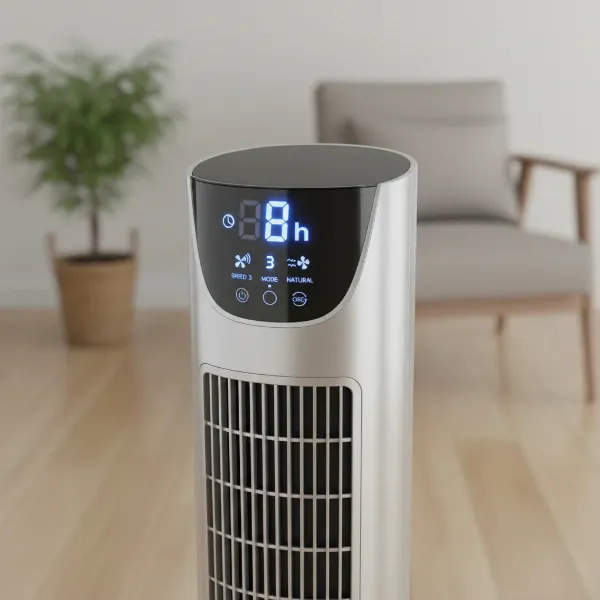 Close-up of a modern electric fan's control panel showing a digital timer display.
Choosing the Right Electric Fan with a Timer
Selecting the perfect fan with a timer involves more than just picking a stylish model. It requires a thoughtful assessment of your specific needs and a close look at key features.
Determine Your Needs
Before diving into specifications, consider how and where you’ll use your fan:
- Room Size: For a small bedroom or office, a compact desk or mini tower fan might suffice. Larger living areas could benefit from a powerful tower or pedestal fan with wide oscillation.
- Purpose of Use: Are you looking for gentle background cooling while you sleep, powerful air circulation during the day, or targeted relief?
- Budget: Prices vary significantly based on features, brand, and fan type. Establish a budget range to narrow down your options.
|
Our Picks for the Best Electric fan in 2026
As an Amazon Associate I earn from qualifying purchases.
|
||
| Num | Product | Action |
|---|---|---|
| 1 | Viniper Portable Rechargeable Fan, Small Desk Fan : 3 Speeds & about 8-24 Hours Longer Working, 180 Rotation, Portable Desktop Fan Small but Mighty, Strong Wind (White, Light Black Blade)6.2 Inch |

|
| 2 | LEVOIT Tower Fan for Bedroom, 25ft/s Velocity Standing Fan with 28dB Quiet for Sleep, Remoter, 12H Timer, 5 Speeds, 4 Modes, 90° Oscillation for Home, Office, Indoor, Bladeless 36 inch, White |
|
| 3 | Amazon Basics 16" Pedestal Fan with Remote, Floor Fan, Standing Fan for Bedroom, Living Room, Office, with 3 Speeds, 3 Modes, Timer, Dual-Layered Blades, Adjustable Height, Tilt Head, 60W, Black |
|
| 4 | XPOWER FC-100S Multipurpose 11 Pro Air Circulator Utility Fan with Oscillating Feature |
|
| 5 | Dreo Fan for Bedroom, 120° Oscillating Standing Fan, Quiet Floor Fan with DC Motor, Pedestal Fan for Room, 9 Speeds, 4 modes, 20dB, 120° Manual Vertical, 37-42" Adjustable Height, 9H Timer, Black |
|
| 6 | Dreo Tower Fan for Bedroom, 25ft/s Velocity Quiet Floor Fan, 90° Oscillating Fans for Indoors with 4 Speeds, 4 Modes, 8H Timer, Standing Fans, Bladeless Fan, Black, Nomad One (DR-HTF007) |
|
| 7 | 10" Modern Standing Fan for Bedroom, Sleek Oscillating Pedestal Fan, 3-Speed & Height Adjustable Compact Floor Fan for Home Office & Dorm |
|
| 8 | Dreo Fan for Bedroom, 120° Oscillating Standing Fans, Quiet Floor Fan with DC Motor, 100ft Pedestal Fans for Room, 9 Speeds, 4 modes, 20dB, 120° Manual Vertical, 37-42" Adjustable Height, 9H Timer |
|
| 9 | Lasko 2520 Oscillating Stand Fan,White 16 Inch |
|
| 10 | Amazon Basics Air Circulator Fan, Desk Fan for Bedroom, Home and Office, With 90-Degree Tilt Head, 3 Speed Settings, Lightweight (3 LBS), 35 Watts, Black, 11.1"W x 6.3"D x 10.9"H |
|
Key Criteria for Selection
When evaluating fans with timers, pay attention to these critical factors:
- Power and Airflow (CFM): Measured in Cubic Feet per Minute (CFM), this indicates how much air the fan moves. Higher CFM generally means more powerful cooling, essential for larger spaces.
- Noise Level: Especially important for bedrooms or quiet workspaces. Look for models with “QuietSet” technology or low decibel (dB) ratings. Many fans offer a “sleep mode” that runs at lower, quieter speeds.
- Timer Functionality: Check the timer range (e.g., 1-hour to 12-hour settings) and ease of programming. Some fans offer simple auto-off timers, while others provide programmable schedules for different days.
- Additional Features:
- Remote Control: Offers convenience, allowing you to adjust settings from across the room.
- Oscillation: Distributes air more broadly, cooling a larger area evenly.
- Multiple Speed Settings & Modes: A wider range of speeds (e.g., 3 to 12+) and modes (e.g., normal, natural breeze, sleep, eco) provides greater customization.
- Smart & App Control: Some advanced fans can be controlled via smartphone apps or voice assistants (like Alexa or Google Assistant), offering superior scheduling and remote management capabilities.
- Brand and Reliability: Reputable brands often offer better durability, customer support, and warranty coverage.
- Energy Efficiency: Beyond the timer, look for fans with energy-saving modes (like “eco mode”) or those utilizing DC motors, which are typically more efficient than traditional AC motors.
Comparing Popular Electric Fan Types
Here’s a quick comparison of common fan types and their suitability for energy-saving with timers:
| Fan Type | Ideal Room Size | Timer Functionality | Noise Level (Typical) | Key Energy Saving Aspect |
|---|---|---|---|---|
| Desk Fan | Small (personal) | Basic auto-off (1-4 hours) | Low to Moderate | Prevents unnecessary running for personal use. |
| Tower Fan | Small to Medium | Common (up to 8-12 hours) | Low to Moderate | Wide oscillation, targeted cooling, often with eco modes. |
| Pedestal Fan | Medium to Large | Common (up to 8-12 hours) | Moderate to High | Powerful airflow, covering large areas effectively with timers. |
| Bladeless Fan | Small to Medium | Advanced (programmable, smart) | Very Low | Highly efficient design, precise timer and smart control. |
| Whole-House Fan | Entire Home | Advanced (thermostat, smart) | Moderate to High | Drastically reduces AC use by flushing hot air efficiently. |
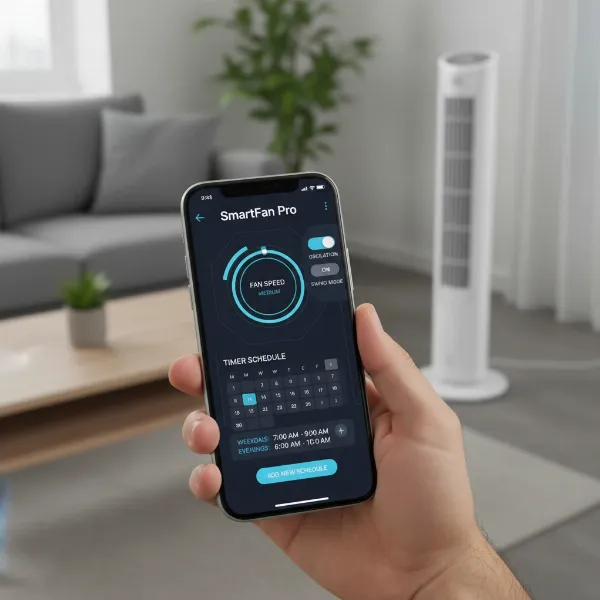 Person using a smartphone app to control a smart fan for energy saving.
Top-Rated Fans with Timers for Energy Saving
Based on expert reviews and user feedback, several models stand out for their effective timer functions and energy-saving benefits. Here’s a look at some noteworthy options:
- Dreo Nomad One Tower Fan: This fan often receives high marks for its quiet operation (around 48 decibels), powerful airflow, and an 8-hour timer combined with an eco mode for enhanced energy efficiency. It also offers a clear digital display and remote control.
- Honeywell QuietSet Series (e.g., 13-inch Mini Tower Fan, Whole Room Tower Fan): Honeywell is recognized for its “QuietSet” technology, providing multiple speed settings with very low noise levels, ideal for bedrooms. These fans typically feature 1, 2, 4, or 8-hour auto shut-off timers and often include auto-dimming display lights for undisturbed sleep.
- Lasko T42950 Portable Electric 42″ Oscillating Tower Fan: Praised for its robust performance, this Lasko model features a timer that can be set for up to 7.5 hours. It also includes a “nighttime feature” that gradually decreases fan speed and dims lights, optimizing for energy saving and sleep comfort.
- Shark TurboBlade Tower Fan: While known for its unique design and powerful, bladeless airflow, this fan also incorporates a timer function, multi-speed settings, and oscillation. Its bladeless design also contributes to easier cleaning.
- Sunpentown DC-Motor Energy Saving Stand Fan: Fans utilizing DC motors, like certain Sunpentown models, are inherently more energy-efficient. Coupled with a timer and remote control, these pedestal fans offer powerful air circulation with reduced electricity consumption.
- IRIS WOOZOO Oscillating Fan (Various Models): Many WOOZOO models, including compact desk and larger circulator fans, come with timer options (e.g., 1, 2, 4 hours) and multiple speed settings. They are often noted for their powerful airflow despite their small footprint, making the timer invaluable for personal energy saving.
Choosing from these models will depend on your specific cooling needs, room size, and desired feature set, but all offer reliable timer functions to help manage energy usage effectively.
“Integrating a fan with a timer into your daily routine is one of the simplest yet most impactful ways to reduce your energy footprint and enhance your comfort, especially during warmer months.” – Johnathan Reed, Electric Fan Expert at ElectricFanatic.com
Tips for Using and Maintaining Your Electric Fan
To maximize the energy-saving potential and lifespan of your timer-equipped electric fan, proper usage and maintenance are key.
Vệ Sinh Quạt Điện Đúng Cách (Proper Fan Cleaning)
Regular cleaning not only ensures optimal performance but also extends your fan’s life and maintains air quality.
- Frequency: Aim to clean your fan at least once a month, or more often if used in dusty environments.
- Tools: You’ll typically need a microfiber cloth, a soft brush (like an old toothbrush), a vacuum cleaner with a brush attachment, and mild soap with water.
- Steps:
- Unplug: Always disconnect the fan from the power source before cleaning.
- Disassemble (if possible): For fans with removable grills and blades, take them apart.
- Dust Removal: Use a vacuum cleaner to remove loose dust from grills and blades. A soft brush can help dislodge stubborn dirt.
- Wipe Down: Clean blades and grills with a damp cloth lightly soaked in soapy water. For bladeless fans, wipe down the air inlets and outlets carefully.
- Dry Thoroughly: Ensure all parts are completely dry before reassembling.
Cách Sử Dụng Quạt Điện An Toàn và Hiệu Quả (Safe and Efficient Fan Use)
Beyond the timer, smart usage habits amplify energy savings.
- Strategic Placement: Position your fan to create a cross-breeze or to push hot air out through a window. For personal cooling, direct it towards yourself.
- Adjust Speed Appropriately: Use lower speeds when a gentle breeze is sufficient. Higher speeds consume more energy.
- Combine with AC: Use fans in conjunction with air conditioning. A fan can make a room feel 3-4 degrees cooler, allowing you to set your AC thermostat higher and save significantly on cooling costs.
- Avoid Continuous Use: This is where your timer truly shines. Set the fan to turn off after you fall asleep, or when you leave a room, preventing unnecessary energy consumption.
Bảo Dưỡng Quạt Điện Để Kéo Dài Tuổi Thọ (Maintaining Your Fan for Longevity)
Periodic checks can prevent small issues from becoming costly repairs.
- Inspect Components: Regularly check cords for fraying and plugs for damage.
- Lubrication (for some models): Older or certain types of fans might benefit from occasional lubrication of motor bearings. Always consult your owner’s manual.
- Proper Storage: When not in use for extended periods, clean the fan, cover it to prevent dust accumulation, and store it in a dry, cool place.
Mua Quạt Điện Ở Đâu Uy Tín? (Where to Buy Reliable Electric Fans)
Finding a reputable retailer is as important as choosing the right fan.
- Electronics Retailers: Large electronics stores and appliance superstores (both physical and online) offer a wide selection of brands and models, often with competitive pricing and extended warranties.
- Online Marketplaces: Websites like Amazon, Best Buy, and other major online retailers provide extensive product reviews, specifications, and direct shipping. Be sure to check seller ratings and return policies.
- Specialty Stores: For whole-house fans or unique designs, a specialty HVAC or home improvement store might offer expert advice and installation services.
When purchasing, always verify the warranty, understand the return policy, and check for certifications that indicate safety and energy efficiency.
Hướng Dẫn Mua Quạt Điện (Electric Fan Buying Guide)
To summarize your journey to finding the ideal energy-saving fan with a timer, ask yourself these three critical questions:
Ngân sách của bạn là bao nhiêu? (What is your budget?)
Determine your spending limit upfront. Basic timer fans can be very affordable, while smart, bladeless, or whole-house models will be a greater investment. Knowing your budget helps you filter options efficiently.
Diện tích phòng của bạn là bao nhiêu? (What is your room size?)
Match the fan’s power and coverage area to your room. A small desk fan won’t effectively cool a large living room, and a powerful pedestal fan might be overkill for a tiny office.
Bạn cần những tính năng gì? (What features do you need?)
Prioritize essential features like timer duration, remote control, oscillation, and noise level. Consider smart features for added convenience if your budget allows. Decide if “eco mode” or specific “sleep settings” are crucial for your lifestyle.
Conclusion
Choosing the best electric fan with a timer for energy saving is a smart decision for any homeowner. By leveraging the convenience of a timer, you can optimize your cooling, prevent wasteful operation, and significantly reduce your electricity bills. From quiet tower fans with extensive timer options to compact desk circulators that offer personal cooling on a schedule, the market provides a solution for every need. Embrace the efficiency and comfort that a timer-equipped electric fan brings, and enjoy a perfectly cooled home without the energy guilt.
What features do you value most in an electric fan when considering its impact on your energy consumption?
Frequently Asked Questions
How do fan timers specifically help save energy?
Fan timers save energy by automatically turning off the fan after a preset period, preventing it from running unnecessarily for hours, especially overnight or when you leave the room. This targeted operation reduces electricity consumption and lowers your utility bills.
Are fans with DC motors more energy-efficient with timers?
Yes, fans equipped with DC (Direct Current) motors are generally more energy-efficient than those with traditional AC (Alternating Current) motors. When combined with a timer, DC motor fans provide a double benefit: precise control over operation duration and lower power consumption during their running time.
Can I add a timer to an existing electric fan without one?
While some fans cannot have integrated timers added post-purchase, you can use an external smart plug or a simple outlet timer. These devices allow you to program on/off schedules, effectively giving any electric fan a timer function, enhancing convenience and energy saving.