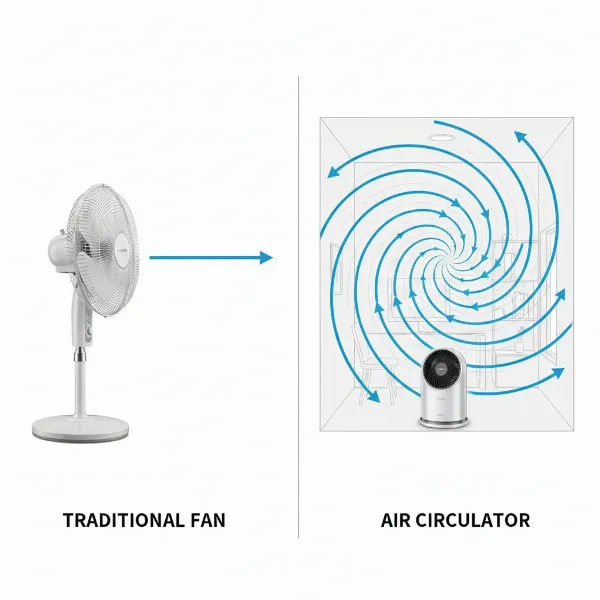
In an era where indoor air quality is paramount, electric fans have evolved beyond simple cooling devices. Modern innovations integrate advanced air purification technologies, with ionizers leading the charge in enhancing the air we breathe. If you’re seeking to elevate your home environment with cleaner, fresher air while enjoying a comfortable breeze, an electric fan with an ionizer might be your ideal solution. This guide will explore the world of ionizer fans, helping you understand their benefits, how to choose the right one, and spotlighting some of the best models available today.
Electric Fans with Ionizers: Overview and Popular Types
Electric fans with ionizers are designed not only to circulate air but also to actively purify it by releasing negative ions. These negative ions attach to airborne particles such as dust, pollen, pet dander, and smoke, making them heavier and causing them to fall out of the air. This process effectively reduces allergens and pollutants, contributing to a noticeably fresher indoor atmosphere. The integration of this technology marks a significant step in the evolution of home comfort appliances, offering a dual benefit of cooling and air purification.
Historically, fans focused solely on air movement. However, as awareness of indoor air pollution grew, manufacturers began to incorporate features like ionizers. These devices typically come in various forms, including tower fans, which are tall and slim, ideal for widespread oscillation, and compact desktop or personal fans. There are also multi-functional units that combine a fan with a full air purification system, including HEPA filters and activated carbon, alongside an ionizer.
Advantages of Ionizer Fans:
- Improved Air Quality: Effectively reduces airborne pollutants and allergens.
- Odor Elimination: Negative ions can help neutralize unpleasant odors from cooking, pets, or smoke.
- Enhanced Freshness: Creates a feeling of cleaner, crisper air, often described as similar to post-rain freshness.
- Energy Efficient: Many ionizers consume very little power, adding minimal cost to operation.
Disadvantages of Ionizer Fans:
- Ozone Production: Some ionizers can produce small amounts of ozone, a lung irritant, which is a concern for health experts. It’s crucial to check for low or zero ozone emission certifications.
- No Particle Removal: While particles fall out of the air, they are not physically removed from the room, requiring regular cleaning of surfaces.
- Limited Filtration: Stand-alone ionizers typically do not offer the same level of particle filtration as units with HEPA filters.
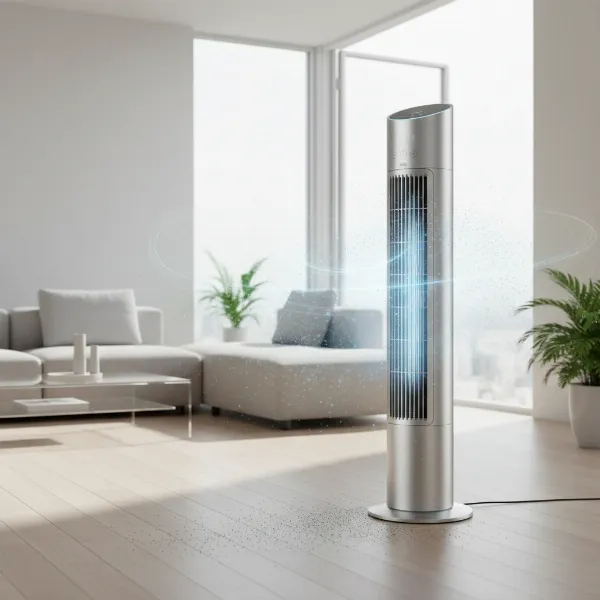 Modern electric ionizer fan purifying indoor air by releasing negative ions, showing dust particles settling.
How to Choose the Right Ionizer Fan for Your Needs
Selecting the perfect ionizer fan involves considering several factors to ensure it aligns with your specific requirements for cooling and air purification.
Determining Your Usage Requirements
Before diving into product specifications, assess what you need most from your fan.
- Room Size: A fan’s coverage area is crucial. Larger rooms require more powerful fans with higher airflow (measured in CFM – Cubic Feet per Minute) and wider oscillation. Smaller rooms or personal spaces might benefit from compact desktop models.
- Purpose of Use: Are you primarily looking for cooling with a secondary benefit of air freshness? Or is air purification, including allergen and odor removal, your main goal? Some units offer robust filtration alongside ionization.
- Budget: Ionizer fans vary widely in price based on features, brand, and design. Define your budget range to narrow down options without compromising essential features.
|
Our Picks for the Best Electric fan in 2026
As an Amazon Associate I earn from qualifying purchases.
|
||
| Num | Product | Action |
|---|---|---|
| 1 | Dreo Fan for Bedroom, 120° Oscillating Standing Fan, Quiet Floor Fan with DC Motor, Pedestal Fan for Room, 9 Speeds, 4 modes, 20dB, 120° Manual Vertical, 37-42" Adjustable Height, 9H Timer, Black |

|
| 2 | Dreo Fan for Bedroom, 120° Oscillating Standing Fans, Quiet Floor Fan with DC Motor, 100ft Pedestal Fans for Room, 9 Speeds, 4 modes, 20dB, 120° Manual Vertical, 37-42" Adjustable Height, 9H Timer |
|
| 3 | Viniper Portable Rechargeable Fan, Small Desk Fan : 3 Speeds & about 8-24 Hours Longer Working, 180 Rotation, Portable Desktop Fan Small but Mighty, Strong Wind (White, Light Black Blade)6.2 Inch |
|
| 4 | Amazon Basics Air Circulator Fan, Desk Fan for Bedroom, Home and Office, With 90-Degree Tilt Head, 3 Speed Settings, Lightweight (3 LBS), 35 Watts, Black, 11.1"W x 6.3"D x 10.9"H |
|
| 5 | 10" Modern Standing Fan for Bedroom, Sleek Oscillating Pedestal Fan, 3-Speed & Height Adjustable Compact Floor Fan for Home Office & Dorm |
|
| 6 | LEVOIT Tower Fan for Bedroom, 25ft/s Velocity Standing Fan with 28dB Quiet for Sleep, Remoter, 12H Timer, 5 Speeds, 4 Modes, 90° Oscillation for Home, Office, Indoor, Bladeless 36 inch, White |
|
| 7 | Lasko 2520 Oscillating Stand Fan,White 16 Inch |
|
| 8 | Amazon Basics 16" Pedestal Fan with Remote, Floor Fan, Standing Fan for Bedroom, Living Room, Office, with 3 Speeds, 3 Modes, Timer, Dual-Layered Blades, Adjustable Height, Tilt Head, 60W, Black |
|
| 9 | XPOWER FC-100S Multipurpose 11 Pro Air Circulator Utility Fan with Oscillating Feature |
|
| 10 | Dreo Tower Fan for Bedroom, 25ft/s Velocity Quiet Floor Fan, 90° Oscillating Fans for Indoors with 4 Speeds, 4 Modes, 8H Timer, Standing Fans, Bladeless Fan, Black, Nomad One (DR-HTF007) |
|
Key Criteria for Selection
Once your needs are clear, focus on these critical specifications:
- Airflow and Fan Speeds: Look for adjustable fan speeds to control the intensity of cooling and air circulation. Higher CFM indicates more powerful airflow.
- Noise Level: Since fans often run for extended periods, especially in bedrooms or offices, a low noise level (ideally below 30-40 decibels) is essential for comfort. Many models offer a “sleep mode” for ultra-quiet operation.
- Additional Features:
- Timer: Allows you to set the fan to turn off automatically after a specified duration.
- Remote Control: Offers convenience for adjusting settings from a distance.
- Oscillation: Ensures widespread air distribution across the room.
- HEPA & Activated Carbon Filters: For multi-functional units, these filters provide superior particle and odor removal, complementing the ionizer.
- Smart Features: App control, voice assistant compatibility, and auto-modes for intelligent operation.
- Brand Reputation and Reliability: Opt for reputable brands known for quality and customer support. Checking warranty information is also advisable.
- Energy Efficiency: Look for models with low power consumption, particularly if you plan to use the fan frequently. Many ionizers are inherently energy-efficient.
- Ozone Emission Levels: This is particularly important for ionizers. Ensure the product states low or zero ozone emission, ideally below 0.05 parts per million (ppm), to avoid potential health issues. Some safety experts advise caution with ionizers due to ozone production.
Comparing Popular Ionizer Fan Types
- Tower Fans with Ionizers: These are popular for their slim design, wide oscillation, and often include features like timers and remote controls. They are excellent for cooling medium to large rooms while providing air freshening.
- Desktop Fans with Ionizers: Compact and portable, ideal for personal spaces, offices, or small bedrooms. They offer targeted cooling and air purification.
- Air Purifier and Fan Combos with Ionizers: These all-in-one devices provide comprehensive air purification (often with HEPA and activated carbon filters) along with fan functionality and an ionizer. They are best for those prioritizing air quality above all else.
“Choosing an ionizer fan means finding a balance between effective cooling and clean air delivery. Always prioritize low ozone emissions for household use.” – Admin, ElectricFanatic.com
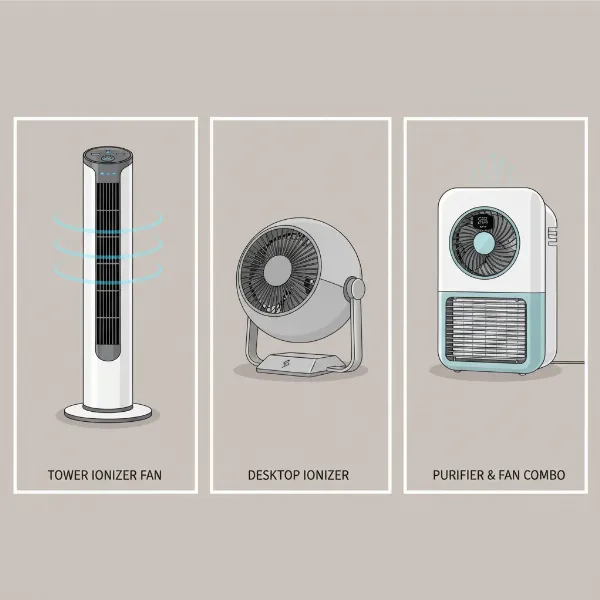 A visual comparison of different ionizer fan types: a tall tower fan, a compact desktop fan, and a multi-functional air purifier combo unit.
Top 5 Ionizer Electric Fans for Enhanced Air Quality
Here’s a selection of top-performing electric fans that incorporate ionizer technology, offering a range of features for various needs and preferences.
| Model Name | Type | Key Features | Noise Level (Approx.) | Energy Consumption (Approx.) |
|---|---|---|---|---|
| Lasko Wind Curve Tower Fan with Fresh Air Ionizer | Tower Fan | 3 speeds, widespread oscillation, timer (up to 7.5 hrs), remote, fresh air ionizer, ETL listed safety fuse. | Quiet (good for TV) | Low |
| Lasko 2505 Portable Electric 36” Oscillating Tower Fan with Fresh Air Ionizer | Tower Fan | 3 speeds, widespread oscillation, timer (0.5-7.5 hrs), remote, fresh air ionizer, space-saving design. | Very Quiet | Low |
| POMORON 4-in-1 Air Purifier for Home with Ionizer | Air Purifier/Fan | 4-in-1 (purifier, ionizer, UV light, fan), H13 True HEPA Filter, 4 fan speeds, 8/12/24hr timer, ultra-quiet sleep mode. | 25dB (sleep mode) | Low |
| OION Technologies B-1000 Ionic Air Purifier Pro Ionizer | Air Purifier/Fan | Permanent filter (no replacements), negative ion output, UVGI technology, whisper-quiet fan, night light, low energy use. | Whisper Quiet | 7.5W |
| Portable Desktop Air Purifier & Fan Combo with Ionizer | Desktop/Combo | 3-speed fan, built-in ionizer, HEPA filter, aroma diffuser, lightweight, compact, 4-layer purification. | N/A | N/A |
1. Lasko Wind Curve Tower Fan with Fresh Air Ionizer
The Lasko Wind Curve series stands out for its sleek, bladeless tower design and powerful airflow. Equipped with a “Fresh Air Ionizer,” this fan aims to make the air feel crisper and cleaner by releasing negative ions. It features three quiet speeds, widespread oscillation for full room coverage, and a convenient timer function (up to 7.5 hours) with a remote control. The Lasko Wind Curve is a popular choice for bedrooms and living areas, offering both effective cooling and air freshening. Its user-friendly controls and robust build from a trusted brand make it a reliable option for daily use.
2. Lasko 2505 Portable Electric 36” Oscillating Tower Fan with Fresh Air Ionizer
Another excellent offering from Lasko, the 2505 model provides similar benefits in a slightly more compact 36-inch design. This portable electric tower fan also integrates a “Fresh Air Ionizer” to disperse negative ions, helping to reduce airborne particles and create a fresher environment. It boasts three quiet speeds, an oscillation feature, and a timer for personalized comfort. Its space-saving footprint makes it ideal for smaller rooms, dorms, or home offices where floor space is at a premium. The Lasko 2505 is known for its very quiet operation, ensuring minimal disturbance.
3. POMORON 4-in-1 Air Purifier for Home with Ionizer
For those seeking a more comprehensive air quality solution, the POMORON 4-in-1 unit combines a fan, ionizer, UV light, and H13 True HEPA filtration. This device is designed to tackle a wide range of indoor air pollutants, including dust, pollen, dander, and odors, while also generating negative ions for enhanced freshness. It features four fan speeds, an ultra-quiet sleep mode (as low as 25dB), and a flexible timer. The inclusion of a medical-grade H13 HEPA filter ensures thorough purification, making it suitable for allergy sufferers or homes with pets.
4. OION Technologies B-1000 Permanent Filter Ionic Air Purifier Pro Ionizer
The OION Technologies B-1000 offers a unique approach with its filterless design, utilizing negative ion output and UVGI technology for air purification. This ionic air purifier features a whisper-quiet purification fan and a subtle night light, making it unobtrusive in any room. Its key advantage is the permanent filter, eliminating the need for costly replacements, which saves money and is environmentally friendly. With ultra-low energy consumption, this model is ideal for continuous use in occupied spaces, reducing odors and circulating fresh air without the hassle of maintenance.
5. Portable Desktop Air Purifier & Fan Combo with HEPA Filter, Aroma & Ionizer
This versatile desktop unit is perfect for creating a personal fresh air zone. It combines a 3-speed mini-fan with a built-in ionizer, a HEPA filter for effective particle removal, and even an aroma diffuser for a pleasant scent experience. Its compact and lightweight design makes it highly portable, easily moving from your desk to a bedside table. Despite its small size, it offers powerful air cleaning capabilities with a 4-layer purification system. This combo unit is an excellent choice for individuals who want multi-functional air enhancement in their immediate surroundings.
Tips for Using and Maintaining Your Ionizer Fan
To ensure your ionizer fan operates effectively and lasts longer, proper usage and regular maintenance are essential.
Proper Cleaning of Your Ionizer Fan
Regular cleaning is vital, especially for ionizers, as they attract airborne particles.
- Frequency: Aim to clean your fan every 2-4 weeks, or more often if you live in a dusty environment or have pets.
- Required Tools: You’ll typically need a soft cloth, a small brush (often supplied with the fan), a vacuum cleaner with a brush attachment, and mild soap if washing grates.
- Step-by-step Cleaning Process:
- Unplug the Fan: Always disconnect the fan from power before cleaning.
- External Surfaces: Wipe down the exterior with a soft, damp cloth.
- Grilles and Blades: For tower fans, remove the rear grille if possible. Use a vacuum cleaner with a brush attachment to remove dust from grilles and fan blades. If removable, wash plastic grates with mild soap and water, ensuring they are completely dry before reassembling.
- Ionizer Needles/Grates: Carefully clean the metal ionizer needles or grates with a small, dry brush (often supplied). These components are where ions are emitted and can accumulate dust. Do not use water or harsh chemicals on these sensitive parts.
- Filters (if applicable): If your fan includes HEPA or activated carbon filters, follow the manufacturer’s instructions for cleaning or replacement. Permanent filters like in the OION B-1000 may require simple rinsing.
Safe and Effective Use
Maximizing your fan’s benefits while ensuring safety.
- Optimal Placement: Place your ionizer fan on a stable, flat surface, away from walls to allow for proper air intake and circulation. For air purifiers, a central location in the room is often best.
- Adjusting Settings: Use the appropriate fan speed for your comfort and room size. Higher speeds provide more cooling and air circulation but may increase noise. Utilize oscillation for wider coverage.
- Avoid Continuous Long-Term Use (Ozone Consideration): While most modern ionizers are designed to produce minimal ozone, it’s wise to ensure good ventilation in the room. If a fan has an ionizer feature that can be turned off, consider using it intermittently or in well-ventilated spaces, especially if you are sensitive to air quality. Always check the manufacturer’s specifications regarding ozone output.
Extending Lifespan through Maintenance
Proactive care keeps your fan running efficiently.
- Check and Replace Components: Regularly inspect for any wear and tear. If your fan has filters, adhere to the recommended replacement schedule to maintain purification efficiency.
- Proper Storage: When not in use, especially during off-seasons, clean the fan thoroughly and store it in a cool, dry place, ideally in its original packaging or covered to protect it from dust.
Where to Buy Reputable Ionizer Fans
Purchasing an ionizer fan from reliable sources ensures you receive a quality product with proper warranty and support.
Recommended Retailers:
- Major Electronics Stores: Large electronics retailers often carry a wide selection of fans and air purifiers, allowing you to compare models in person.
- Department Stores: Many department stores offer home appliances, including various fan models.
- Online Marketplaces: Websites like Amazon offer a vast array of options, often with competitive pricing and detailed customer reviews. Be sure to purchase from verified sellers.
- Brand-Specific Websites: Buying directly from the manufacturer’s website can sometimes provide exclusive deals and direct access to customer service.
Important Buying Tips:
- Inspect the Product: If buying in-store, check for any visible damage. For online purchases, carefully review product images and descriptions.
- Warranty: Always ensure your purchase comes with a manufacturer’s warranty to protect against defects.
- Read Reviews: Customer reviews can provide valuable insights into a product’s real-world performance, noise levels, and durability.
Ionizer Fan Buying Guide
Navigating the market for an ionizer fan can be simplified by focusing on a few key questions about your personal circumstances.
What is your budget?
Ionizer fans can range from under $50 for basic desktop models to several hundred dollars for advanced multi-functional tower units or air purifier combos. Define a realistic budget early on. If your budget is tighter, prioritize core features like effective cooling and a basic ionizer, rather than advanced smart functionalities. Mid-range options often provide a great balance of performance and features, while premium models offer superior air purification, quieter operation, and smart connectivity.
What is your room size?
The size of the room where the fan will be used dictates the necessary power and coverage. For small rooms (under 150 sq. ft.), a desktop fan or a smaller tower fan will suffice. For medium to large rooms (150-400 sq. ft. or more), a powerful oscillating tower fan or an air purifier/fan combo with a higher Clean Air Delivery Rate (CADR, for purifier functions) is recommended to ensure effective air circulation and ionization throughout the space.
What features do you need?
Beyond basic cooling and ionization, consider which additional features would enhance your experience. Do you need a remote control for convenience? Is a timer essential for overnight use? For those with allergies, a unit that combines an ionizer with a HEPA filter would be highly beneficial. If odors are a concern, look for activated carbon filtration. Smart features like app control or voice assistant compatibility can add a layer of modern convenience for tech-savvy users. Prioritize features that directly address your primary needs for comfort and air quality.
Conclusion
Electric Fans with ionizers represent a smart investment for anyone looking to combine effective cooling with improved indoor air quality. By actively reducing airborne pollutants and neutralizing odors, these devices offer a breath of fresh air, both literally and figuratively. When choosing your ideal fan, remember to consider room size, your specific needs (cooling, purification, odor control), budget, and crucial features like low ozone emission and noise level. With models ranging from sleek tower fans to comprehensive air purifier combos, there’s an ionizer fan out there to suit every home and lifestyle. Embrace cleaner, fresher air and enhanced comfort with the right ionizer fan.
What aspect of indoor air quality are you most concerned about in your home?
Frequently Asked Questions
Are ionizer fans safe?
Most modern ionizer fans are designed to be safe, with many producing very low or undetectable levels of ozone, which is a lung irritant. It is crucial to choose products from reputable brands and check for certifications or specifications indicating low ozone output (ideally below 0.05 ppm). Some safety experts advise using ionizers in well-ventilated areas or opting for models that allow the ionizer feature to be turned off.
How do ionizer fans purify air?
Ionizer fans purify air by releasing a stream of negatively charged ions into the environment. These negative ions attach to positively charged airborne particles like dust, pollen, pet dander, and smoke. Once attached, the particles become heavier and fall out of the air, settling on surfaces where they can be cleaned away, effectively reducing their presence in the breathable air.
Do ionizer fans produce ozone?
Some ionizer fans can produce ozone as a byproduct of the ionization process. While many manufacturers strive to keep ozone emissions at very low, safe levels, it is a point of concern for some health organizations. Always check product specifications for ozone output and consider models certified for low or zero ozone emissions to ensure maximum safety.
Can ionizer fans help with allergies?
Yes, ionizer fans can help alleviate allergy symptoms by reducing airborne allergens such as pollen, dust, and pet dander. The negative ions cause these microscopic particles to clump together and settle out of the air, preventing them from being inhaled. For severe allergies, combining an ionizer fan with a HEPA filter is often recommended for comprehensive particle removal.
How often should I clean my ionizer fan?
It is generally recommended to clean your ionizer fan every 2-4 weeks, or more frequently if you notice visible dust accumulation or live in a particularly dusty environment. Regular cleaning, especially of the ionizer needles and grilles, is important to maintain optimal performance and prevent dust buildup on the components responsible for ion emission.